
Workforce
Zoho Shifts solutions set up the way you work.
Employee scheduling and time tracking for hourly teams, covering clash-free rosters, shift swaps, clock-ins and payroll-ready timesheets.
- Staff Availability
- Time Off Requests
- Mobile Clock-ins
- Kiosk App
- Job Sites
- Pay Rules
 Zoho ShiftsWorkforce
- Published Rosters
- Timesheets
- Payroll Reports
About Shifts
What Zoho Shiftsdoes.
The core of what Zoho Shifts offers, based on Zoho's official product documentation. It keeps managers and hourly staff working from the same live roster, on the web and on iOS and Android.
- FasterRostering
- VerifiedClock-ins
- CleanerTimesheets
01Shift scheduling
Build rosters with drag and drop, reuse templates and copy last week's plan across teams and locations.
- Schedule templates
- Shift templates
- Recurring shifts
- Multiple locations
02Open shifts & swaps
Let qualified staff pick up unfilled shifts or trade with coworkers, within the constraints managers set.
- Open shifts
- Shift Swap, Offer & Drop
- Availability preferences
- Skills management
03Auto-schedule
Fill unpublished open shifts automatically using roles, availability and a fairness or labor-cost priority. Currently in beta.
- Auto-schedule (beta)
- Schedule constraints
04Time clock
Staff clock in from their phones or a shared tablet, with location checks confirming they are on site.
- Mobile app clock in
- Kiosk app clock in
- GPS geolocation tagging
- Geofencing
- Auto-clock out
05Timesheets & breaks
Review worked hours against the schedule, track breaks and approve time entries before payroll.
- Timesheet management
- Break tracking
- Time clock rules
- Time entry approvals
06Time off
Handle leave requests in one place and let balances build up under the policies you configure.
- Time off requests
- Time off accrual
- Time off policies
- Balances
07Pay rules & payroll
Apply overtime and shift differentials, set pay periods and finalize reports for your payroll team.
- Custom overtime rules
- Shift premium
- Pay periods
- Payroll export
08Team messaging & reports
Reach staff through chats and channels, and report on attendance, worked hours and scheduled cost.
- Team messaging
- Attendance report
- Scheduled vs. actual report
- Audit logs
How Xevort helps
Making Shifts work your way.
What our team can set up, customize and connect in Zoho Shifts.
Setup
Schedules, positions, job sites, employees and access levels created to reflect your locations and teams.
Customize
Shift and schedule templates, schedule preferences and notification settings shaped to how each site operates.
Automate
Shift reminders, missed-punch alerts, auto-clock out and approval permissions so managers chase less.
Integrate
Shifts data synced to Zoho Analytics, calendars and other systems through the Shifts REST API.
Time clock
Mobile and kiosk clock-in, geofence radius per job site and late or early punch restrictions configured.
Pay rules
Overtime, double overtime and shift differentials entered from the pay policies your team provides.
Time off
Time off types, accrual policies and default assignments set up so balances stay current.
Payroll export
Pay periods and timesheet export formats arranged to match what your payroll provider imports.
Integrations
Connect Zoho Shiftswith the tools you use.
We can connect Shifts with other Zoho apps and the services you already use, so records move between them without anyone re-typing them.
- Native Zoho connectionsZoho apps that share data with each other out of the box.
- Delivered by XevortIntegrations our team has built on client projects.
- Officially supportedConnectors Zoho provides, set up and mapped to your process.
 Analytics
 Google Calendar
 Outlook
 Apple Calendar
- Custom API
Why choose Zoho Shifts
Rosters that hold upwhen plans change.
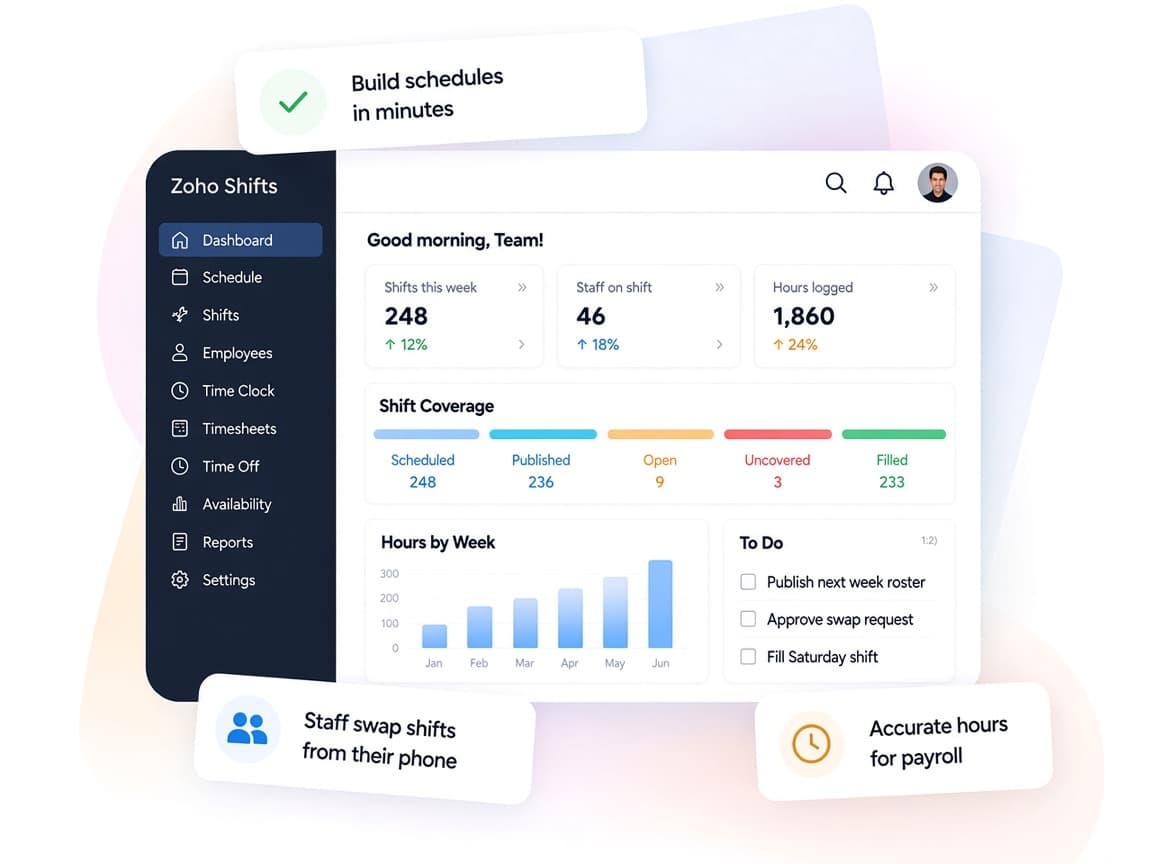
Zoho Shifts gives hourly teams a shared schedule, a reliable time clock and payroll-ready hours, so managers spend less time on spreadsheets and calls.
- Schedule and hours togetherPlanned shifts, actual punches and time off sit side by side.
- Staff stay in the loopMobile access, reminders and messaging keep everyone informed of changes.
- Rules applied consistentlyOvertime, break and clock-in settings follow the configuration you approve.
- Labor cost visibilityScheduled cost, worked hours and attendance reports for each location.
- Smarter coverageAuto-schedule, in beta, fills open shifts based on roles and availability.
- Controlled accessCustom access levels and audit logs show who changed what and when.
FAQ
Zoho Shiftsquestions, answered.
Straight answers on setup, migration, integrations and timelines before you start.
Still have questions?
Tell us about your Zoho Shifts setup and our team will get back to you.
Yes. We create a schedule for each location, team or department, add positions and job sites, and assign managers so each one controls only the rosters they own.
Yes. Zoho Shifts supports GPS tagging and geofencing on its mobile app, plus a kiosk app for shared devices. We configure the radius and clock-in restrictions for each schedule or job site.
Yes. We enter overtime, double overtime and shift differential rules in Zoho Shifts as your team specifies them. Decisions about what the law requires stay with your HR or legal advisors.
Zoho Shifts produces payroll reports and exports finalized timesheets for your payroll provider. Where a direct connection is needed, we can build one with the Shifts API after confirming what your payroll system accepts.
Yes. We import employee lists, positions and wage details, rebuild recurring shifts as templates and test the setup with a pilot team before everyone switches over.
This depends on the systems involved, API availability, data complexity, testing requirements and business rules. These are typical Xevort project estimates, not fixed delivery commitments.
Free Zoho consultation
Ready to get more from Zoho Shifts?
Tell us how your business works, what you want to improve, and where Zoho fits today. We'll recommend the right approach, with no obligation.
- Reply within 1 business day
- New or existing Zoho setups
- Fixed-scope proposals