
Finance
Zoho Checkout solutions set up the way you work.
No-code payment pages for one-time and recurring payments, with coupons, taxes and refunds, shared anywhere your customers are.
- Website Embed
- Payment Links
- QR Codes
- Social Media
- Landing Pages
- Payment Buttons
 Zoho CheckoutFinance
- Payments Collected
- Recurring Billing
- Revenue Reports
About Checkout
What Zoho Checkoutdoes.
The core of what Zoho Checkout offers, based on Zoho's official product documentation. It gives businesses a quick, secure way to get paid online, whether or not they have a website.
- QuickerPayments
- SteadyRecurring revenue
- CleanerReconciliation
01Payment pages
Create hosted pages for fixed, recurring or customer-chosen amounts without writing code.
- Payment Pages
- One-time payments
- Recurring payments
- Custom amounts
02Branding
Pages carry your logo, terms and extra fields, then thank buyers or redirect them after payment.
- Payment Page Branding
- Custom fields
- CAPTCHA
- Redirect URL
03Sharing
Share a page by link, QR code or social post, or embed it and add pay buttons to your site.
- Direct links
- QR codes
- Website embeds
- Embedded buttons
04Recurring payments
Set billing frequency, day and duration, and let automatic retries recover failed charges.
- Billing frequency
- Retry Settings
- Recurring Payments
05Coupons
Percentage or flat discounts with redemption limits and validity periods per page.
- Coupons
- Redemption limits
- Validity periods
06Taxes
Tax rates, groups, rules and exemptions applied automatically at checkout for your region.
- GST
- VAT
- HST/PST/QST
- Sales Tax
07Payments & refunds
Filter transactions and issue full or partial refunds, with credit notes created automatically.
- Payments
- Refunds
- Credit notes
- Multiple gateways
08Reports
Revenue, failed attempts and customer activity reported per payment page over time.
- Net Revenue
- Lost Opportunities
- Customers report
How Xevort helps
Making Checkout work your way.
What our team can set up, customize and connect in Zoho Checkout.
Setup
Organization profile, currencies, users and email notifications configured before the first page goes out.
Customize
Page branding, custom fields, validation rules and thank-you or redirect flows matched to your offer.
Automate
Retry settings, payment alerts and Zoho Flow workflows that act on new payments and refunds.
Integrate
Checkout synced with Zoho Books for accounting, plus Campaigns, Mailchimp, Cliq or Slack alerts.
Payment pages
One-time, recurring and donation pages built for each product, service or fundraising campaign.
Gateways
Zoho Payments, Stripe, PayPal or another supported gateway connected and tested per page.
Tax setup
Tax rates, groups and exemption rules configured for the regions you sell in.
Embeds & links
Pages embedded on your website, with buttons, QR codes and links ready for email and social.
Integrations
Connect Zoho Checkoutwith the tools you use.
We can connect Checkout with other Zoho apps and the services you already use, so records move between them without anyone re-typing them.
- Native Zoho connectionsZoho apps that share data with each other out of the box.
- Delivered by XevortIntegrations our team has built on client projects.
- Officially supportedConnectors Zoho provides, set up and mapped to your process.
 Payments
 Books
 Campaigns
 Cliq
 LandingPage
 Flow
 Desk
 Sites
 Stripe
 PayPal
 Braintree
- VVerifone
- PPayTabs
 Mailchimp
 Slack
- Custom API
Why choose Zoho Checkout
Online payments withoutthe build or the wait.
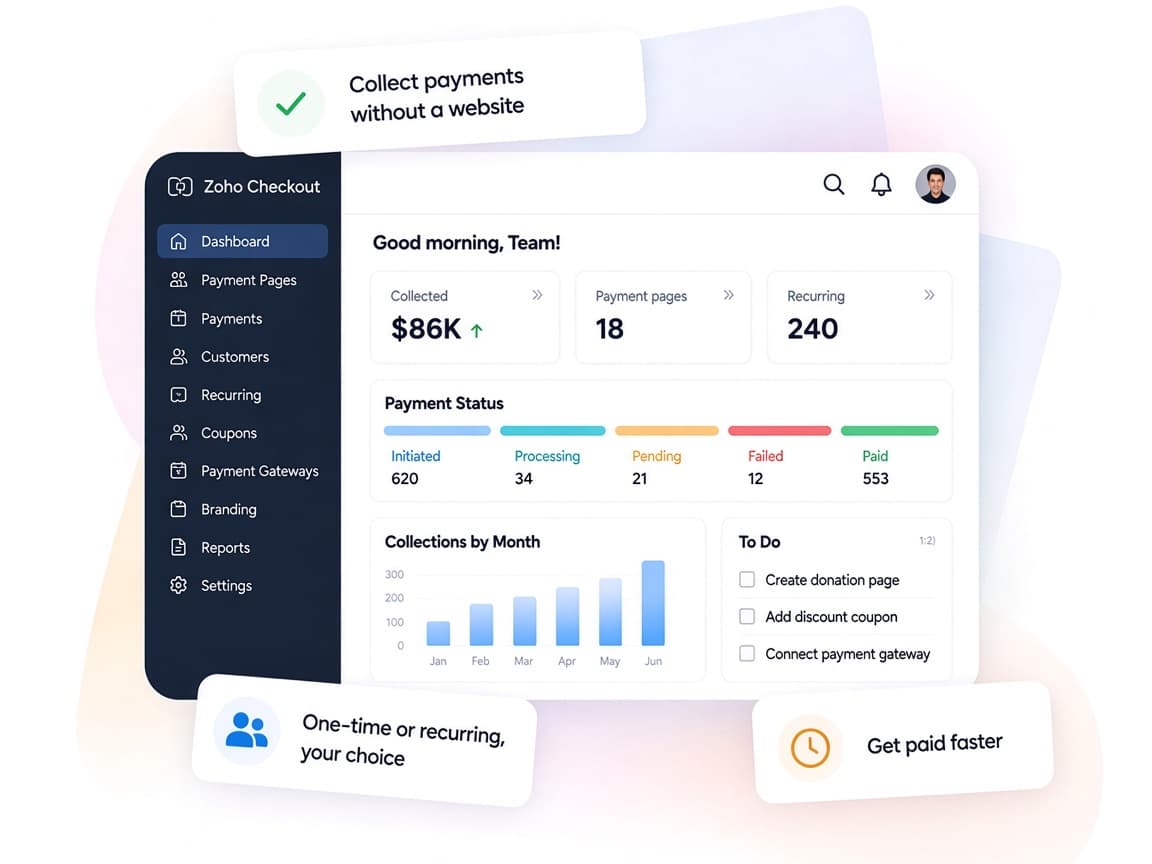
Zoho Checkout turns a product, service or donation into a branded payment page without code, then handles taxes, renewals and refunds behind it.
- Pages to payoutsPages, gateways, coupons and refunds managed together.
- Finance in syncZoho Books receives customers, invoices and taxes automatically.
- Your payment modelOne-time, recurring or pay-what-you-want on each page.
- Revenue clarityNet revenue and lost opportunities reported per page.
- Automatic retriesFailed recurring charges are retried automatically.
- Secure checkoutHosting, security and compliance handled by Zoho, with CAPTCHA.
FAQ
Zoho Checkoutquestions, answered.
Straight answers on setup, migration, integrations and timelines before you start.
Still have questions?
Tell us about your Zoho Checkout setup and our team will get back to you.
No. Payment pages can be shared by link, QR code or social media. If you have a website, we embed the pages or add payment buttons so customers pay without leaving it.
It connects with Zoho Payments and, depending on your region and edition, gateways such as Stripe, PayPal, Braintree, Verifone and PayTabs. We help choose and configure the right one.
Yes. We set up recurring payment pages with billing frequency, billing day and duration, and configure retry settings for failed charges.
Yes. With the Zoho Books integration, customer and invoice data sync automatically and each page can post to a chosen income account. We map accounts and tax preferences for you.
Checkout suits simple payment pages, donations and straightforward recurring payments. Zoho Billing is built for fuller subscription management, so we recommend it when you run multiple plans, add-ons and customer self-service.
This depends on the systems involved, API availability, data complexity, testing requirements and business rules. These are typical Xevort project estimates, not fixed delivery commitments.
Free Zoho consultation
Ready to get more from Zoho Checkout?
Tell us how your business works, what you want to improve, and where Zoho fits today. We'll recommend the right approach, with no obligation.
- Reply within 1 business day
- New or existing Zoho setups
- Fixed-scope proposals